What changes now that Claude Code Review is generally available?
Claude Code Review is GA for Team and Enterprise: reviews take about 6 to 10 minutes, and admins set Quick, Standard or Deep per repository.
Key takeaways
- Claude Code Review became generally available for Claude Team and Enterprise on October 15, 2026.
- Most reviews now take about 6 to 10 minutes, down from about 20 minutes in the preview.
- Owners choose a Quick, Standard or Deep review level per repository; Standard is the default.
- Reviews are billed on token usage through usage credits, with no flat per-review price.
On this page
- What changed in the GA release?
- How does Code Review work?
- Severity levels
- How do the Quick, Standard and Deep levels differ?
- How do you set up and pilot Code Review?
- Requesting reviews from a pull request
- How do REVIEW.md and CLAUDE.md change what gets flagged?
- What does this mean for teams running AI agents?
- What are the limits and open questions?
Code Review for Claude Code, Anthropic's managed pull request reviewer, left research preview and became generally available for Claude Team and Enterprise organizations on October 15, 2026 [1]. The GA release makes most reviews about 3x faster than in the preview, tightens how findings are written, and lets admins pick a Quick, Standard or Deep review level for each repository [1].
What changed in the GA release?
The GA release changes three things: speed, finding quality and per-repository depth. Anthropic says most reviews now finish in about 6 to 10 minutes, down from about 20 minutes during the preview [1]. It also says reviews find more of the bugs that matter, and that each finding states the problem, what triggers it and the fix in a few sentences.
| Area | During the preview | At GA (October 15, 2026) |
|---|---|---|
| Status | Research preview | Generally available for Team and Enterprise |
| Typical review time | About 20 minutes | About 6 to 10 minutes |
| Depth control | Not described in the announcement | Quick, Standard (default) or Deep per repository |
| Finding format | Not described in the announcement | Problem, trigger and fix in a few sentences |
Eligible Claude Enterprise organizations can claim at least $10,000 in Code Review credits by January 15, 2027, and the credits expire 30 days after they are claimed [1]. The announcement says terms apply and does not list them.
How does Code Review work?
Code Review runs each review on Anthropic infrastructure in four stages: find, verify, rank and post [2]. Several agents examine the diff and the surrounding code in parallel, a verification step checks the candidate findings against the code and filters out false positives, the remaining findings are deduplicated and ranked by severity, and the results are posted on the pull request.
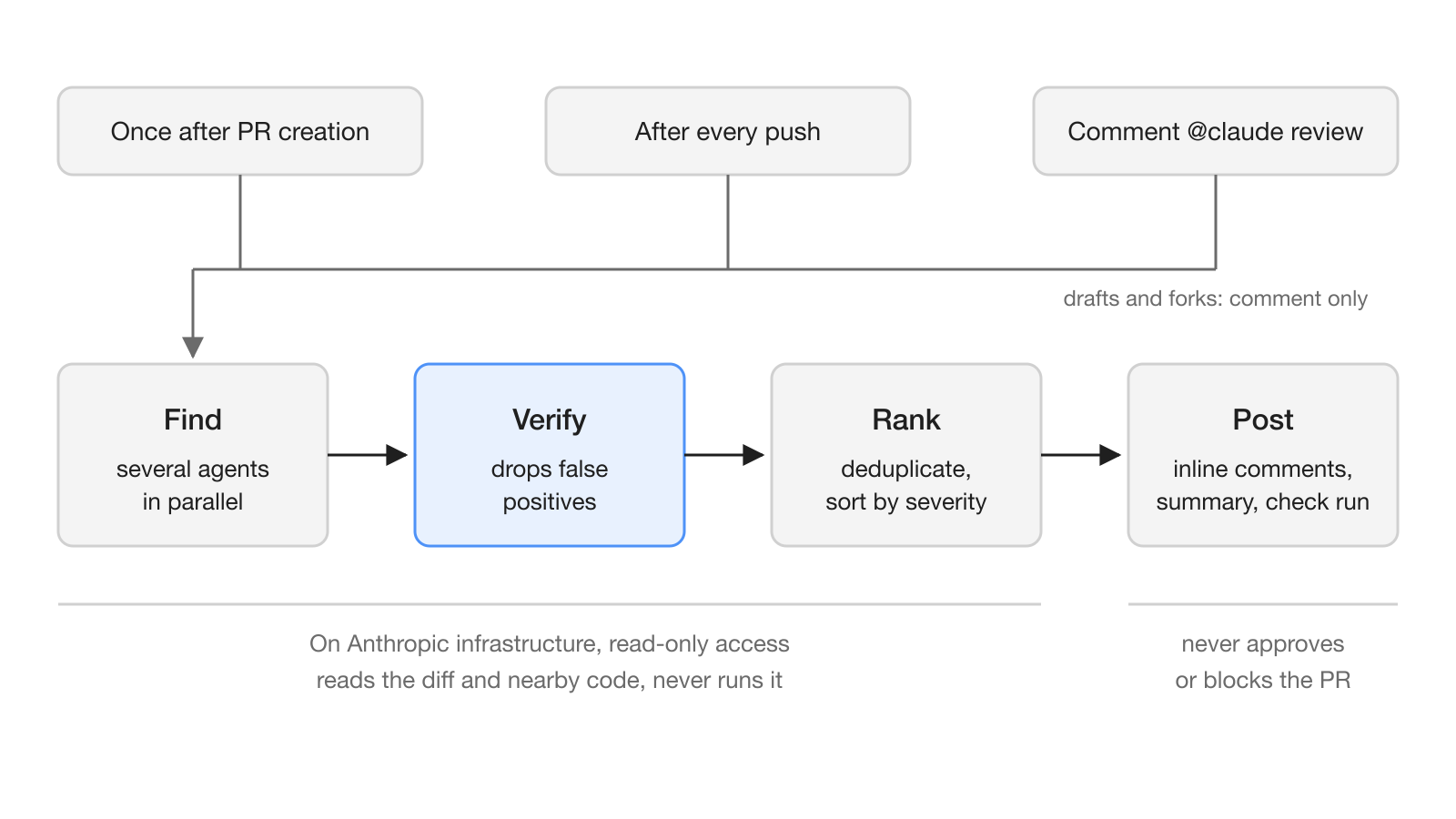
Each review leaves inline comments on the lines concerned, a summary in the review body, and a check run named "Claude Code Review" [2]. The check run concludes as neutral, or as skipped when a push changed no files, and never as a failure, so a finished review does not fail a required check [6]. A review never approves or blocks the pull request; the merge decision stays with your team [2].
By default, Code Review looks for correctness problems that would break production, not formatting preferences or missing test coverage [2]. Inside a review, repository access is read-only, the review does not push commits, and it works from reading the code without building or running it. Code Review also picks the Claude models itself; the admin settings offer no model choice, so the review level is the only depth control.
Severity levels
Every finding carries one of three severity levels [6]:
- Important: a bug that should be fixed before merging.
- Nit: a minor issue, worth fixing but not blocking.
- Pre-existing: a bug that exists in the codebase but was not introduced by this pull request.
How do the Quick, Standard and Deep levels differ?
The review level trades thoroughness against time and cost. Quick is a lighter pass and the cheapest, Standard balances depth, speed and cost and is the default, and Deep is the most thorough pass, takes longest and costs most [3]. An Owner sets one default for the organization and can give a single repository its own level, for example Quick for a routine codebase and Deep for a critical one [2]. A new level applies to reviews that start after the change [3].
The documentation does not publish a price per level. Code Review has no flat per-review price: it is billed on token usage through usage credits, separately from the plan's included usage, and billed to the organization rather than to the developer who opened or requested the review [4]. The cost of each review scales with the review level, the size of the change, the complexity of the surrounding code and how many candidate issues need verification.
The other cost lever is how often reviews run. Each repository has a "Review runs" setting with three options [3]:
| Review runs setting | When a review starts | Cost effect |
|---|---|---|
| Once after PR creation | The PR is opened, reopened or marked ready for review | One automatic review per PR |
| After every push | Every push to the PR branch | Multiplies cost by the number of pushes |
| Manual (@claude review) | Only on a comment command | No automatic reviews |
A repository added from the admin page starts at "After every push", which runs the most reviews [4]. Automatic reviews skip draft pull requests and pull requests from forks in every mode [3].
How do you set up and pilot Code Review?
An Owner of the Claude organization turns Code Review on in the Claude Code admin settings, installs the Claude GitHub App, and selects the repositories to review; after that, reviews run on new pull requests without workflow files in the repositories [1][3]. Installing the app needs an owner of the GitHub organization, and adding a repository needs write access to it from the connected GitHub account [3].
The costs page recommends a small pilot before a wide rollout [4]:
- Set a monthly spend limit for the Claude Code Review service.
- Turn Code Review on for a few representative repositories with "Review runs" set to "Once after PR creation" or "Manual (@claude review)".
- After several reviews, read each repository's "Average cost" column in the Repositories table of the admin settings.
- Multiply that average by the number of pull requests per month, and for "After every push" by the typical number of pushes per pull request.
Code Review skips a review when the Code Review spend limit, the organization spend limit or the usage credit balance runs out, or when what is left is less than the expected cost of one review; developers then see a comment on the pull request that names the cause [4]. Covering a whole GitHub organization at once requires a github.com organization and a monthly spend limit [3].
Requesting reviews from a pull request
Anyone with write, maintain or admin permission on the repository can start a review by posting a top-level comment that begins with @claude review [6]. @claude review always also subscribes the pull request to a review on every later push, and comments from bots never start a review. Before a July 2026 update, @claude review itself subscribed the pull request, so teams that relied on that behavior now need the always form.
If your CI should gate merges on the result, the last line of the check run's details text carries machine-readable severity counts, where the normal key is the number of Important findings [6]:
gh api repos/OWNER/REPO/check-runs/CHECK_RUN_ID \
  --jq '.output.text | split("bughunter-severity: ")[1] | split(" -->")[0] | fromjson'
The documentation warns that a missing line means no verdict, not zero findings, because failed, timed-out, canceled or superseded reviews do not write it.
How do REVIEW.md and CLAUDE.md change what gets flagged?
Two files in the repository steer reviews: CLAUDE.md holds project instructions that Code Review reads as context, and REVIEW.md holds instructions for reviews alone, such as what to flag, at what severity and what to skip [5]. A short REVIEW.md might look like this:
# Review instructions

## Cap the nits
Report at most five Nits per review.

## Do not report
- Anything CI already enforces: lint, formatting, type errors
- Generated files under `src/gen/`
Code Review reads REVIEW.md from the base or default branch, never from the pull request's own changes [5]. Instructions that relax a review, such as lowering a severity, excluding paths or capping nits, are honored from the root file only when the copy comes from a protected default branch. The local /code-review command reads CLAUDE.md but not REVIEW.md, so guidance that both tools should follow belongs in CLAUDE.md.
What does this mean for teams running AI agents?
For teams where coding agents open pull requests next to people, Code Review adds a second set of agents that read every change without being able to merge it. The design keeps humans in charge: the review is read-only, never approves or blocks, and its check run never fails [2][6]. That makes it a reviewer you can add without changing who owns the merge decision.
The per-repository level is the practical change at GA. A team can run Quick on internal tools, Standard on most services and Deep on payment or authentication code, and pair that with "Once after PR creation" on busy repositories to keep spend predictable [3][4].
What are the limits and open questions?
Code Review works only with repositories on GitHub, including GitHub Enterprise Server and GitHub Enterprise Cloud with data residency [2]. It is not available to organizations with Zero Data Retention or the HIPAA configuration, is not covered under Anthropic's Business Associate Agreement, and is not yet available with customer-managed encryption keys. Teams that use Claude Code through Amazon Bedrock, Google Cloud's Agent Platform or Microsoft Foundry still need a Claude organization on a Team or Enterprise plan, and reviews appear on the Anthropic bill [2][4].
Some questions stay open as of October 17, 2026. The announcement gives no benchmark behind "find more of the bugs that matter", the documentation does not say which models each level uses, and no per-level price is published, so the only reliable cost figure is your own pilot. The documentation also notes that a review with no findings does not mean the code is error-free or secure [2].
Frequently asked questions
Which Claude plans include Code Review?
Code Review is available to Claude Team and Enterprise organizations with repositories on GitHub. On other plans you can run the local /code-review command in a Claude Code session instead.
How much does Claude Code Review cost per pull request?
There is no flat per-review price. Reviews are billed on token usage through usage credits, and the cost grows with the review level, the size of the change, the complexity of the surrounding code and how often reviews run.
What is the difference between Quick, Standard and Deep reviews?
Quick is a lighter, faster and cheaper pass, Standard balances depth, speed and cost and is the default, and Deep is the most thorough pass and costs the most. An Owner sets an organization default and can override it per repository.
Can Claude Code Review block or approve a pull request?
No. Code Review posts inline comments, a summary and a check run named Claude Code Review, but it never approves or blocks a pull request and its check run never concludes as a failure.
Why does Code Review ignore changes to REVIEW.md in my pull request?
Code Review reads REVIEW.md from the base or default branch, never from the pull request's own changes. Merge the REVIEW.md change first, and protect the default branch so that instructions which relax reviews are honored.