How do you manage GitHub Copilot models after the October 19 retirements?
GitHub retired six Copilot models on October 19, 2026 and made the model policy REST API GA, so admins can enable replacements per enterprise, team or org.
Key takeaways
- GitHub retired six Copilot models on October 19, 2026, including GPT-5.5, GPT-5.4 and Grok 4.5.
- The suggested replacements are now GPT-6.1 Sol, GPT-6 Luna, Gemini 3.8 Flash and Grok 4.7.
- GET and PATCH model policy endpoints are now GA for enterprises, enterprise teams, enterprise apps and organizations.
- The Copilot default policy for new features takes effect on October 22, 2026.
On this page
- Which Copilot models were retired on October 19, 2026?
- Will your team get the replacement models automatically?
- How do Copilot model policies flow from enterprise to teams?
- What does the model policy REST API do?
- How do you check and enable the replacement models?
- What does this mean for teams running AI agents?
- What are the limits and open questions?
GitHub retired six models from GitHub Copilot on October 19, 2026, including GPT-5.5, GPT-5.4 and Grok 4.5, across chat, completions and agent mode [1]. The same day, GitHub made GET and PATCH REST endpoints for Copilot model policies generally available at the enterprise, enterprise team, enterprise app and organization levels [2]. Together, these decide which models your agents can switch to, and let you set that in code.
Which Copilot models were retired on October 19, 2026?
Six models were deprecated on October 19, 2026, and GitHub names a suggested alternative for each [1]. The retirement covers most Copilot experiences: Copilot Chat, inline edits, ask and agent modes, and code completions.
| Retired model | Suggested alternative (October 19 entry) | Alternative named on September 18 |
|---|---|---|
| Gemini 3.7 Flash | Gemini 3.8 Flash | Gemini 3.8 Flash |
| GPT-5.5 | GPT-6.1 Sol | GPT-5.6 Sol |
| GPT-5.4 | GPT-6.1 Sol | GPT-5.6 Sol |
| GPT-5.4 mini | GPT-6 Luna | GPT-5.6 Luna |
| GPT-5 mini | GPT-6 Luna | GPT-5.6 Luna |
| Grok 4.5 | Grok 4.7 | Grok 4.6 |
The third column matters if you planned your migration a month ago. The September 18 announcement suggested GPT-5.6 Sol, GPT-5.6 Luna and Grok 4.6 [3]. The October 19 entry points to newer models instead [1]. GitHub's supported models page lists both sets as generally available: GPT-6.1 Sol, GPT-6 Luna, Gemini 3.8 Flash and Grok 4.7, as well as GPT-5.6 Sol, GPT-5.6 Luna and Grok 4.6 [7]. If you are choosing a target today, the October 19 list is the current advice.
You do not need to do anything to remove the retired models, according to GitHub [1]. What you may need to do is enable the alternatives. Once a model is enabled through your model policies, it shows up in the Copilot Chat model selector in VS Code and on github.com.
Will your team get the replacement models automatically?
Usually yes, but only if you left the default on. Under default model enablement, Copilot Business and Copilot Enterprise customers receive the alternatives automatically, unless an administrator turned off the global default or disabled the specific model [3].
The setting behind this is the "Default availability for released models" policy. A new generally available model follows it until someone configures that model explicitly [6]. Some models never follow it: pre-GA models, open-weight models and models not covered by GitHub's data retention agreement are disabled by default. Enterprises that restrict models for data residency or FedRAMP also skip models that do not meet those restrictions.
How do Copilot model policies flow from enterprise to teams?
Model policies flow down from an enterprise baseline. At the enterprise level, each model is Enabled, Disabled or delegated to a lower level. Models nobody has configured show "Delegate to Default Policy" and follow the default availability policy [5].
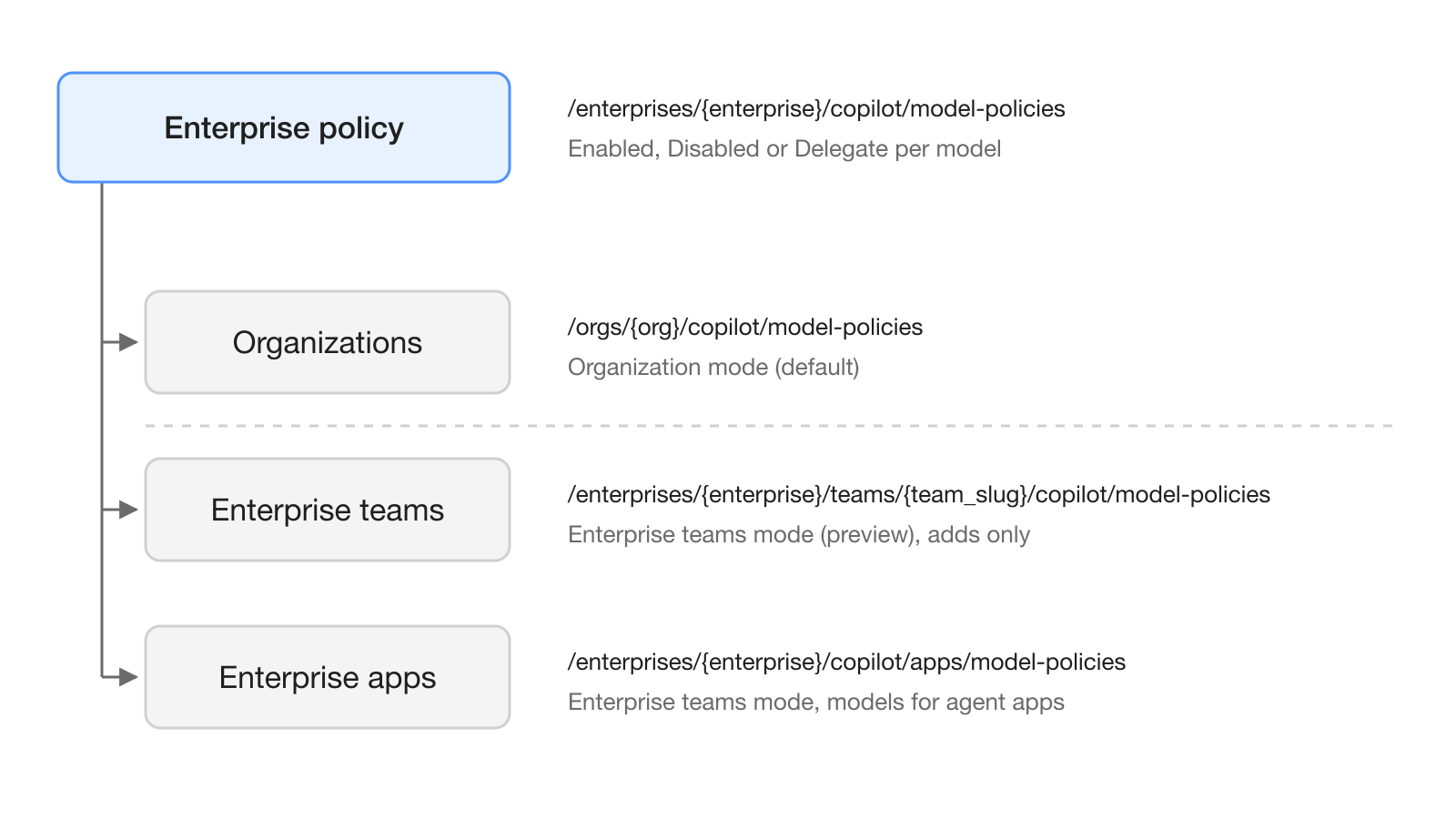
Delegation works in one of two modes:
- Organization mode is the default. Enterprise owners delegate per-model decisions to organizations, and organization owners set each model to enabled or disabled. An organization that leaves a model unconfigured falls back to "Default availability for released models" [5].
- Enterprise teams mode is an opt-in preview. Organization-level model settings are turned off, and models are enabled for specific enterprise teams. You can roll back during the preview, but enterprise-level policy changes made after switching are not preserved [5].
In teams mode, the baseline can only be added to. A model disabled at the enterprise level cannot be enabled for a team, and a model enabled at the enterprise level is always enabled for every team. Teams have no "disabled" option. A person in several teams gets every model that any of their teams enables [5].
Agent apps get a rule of their own. They use the models enabled in the organization or personal account that installed them, and in teams mode their models are controlled at the enterprise level [5]. If a third-party agent app on your repositories stopped working on October 19, check which models are enabled for its installing organization first.
What does the model policy REST API do?
The model policy API lets you read and change the same settings that sit under AI controls, then Copilot, then Configure models in the enterprise settings [5]. The changelog lists GET and PATCH at four paths [2]:
| Level | Path |
|---|---|
| Enterprise | /enterprises/{enterprise}/copilot/model-policies |
| Enterprise teams | /enterprises/{enterprise}/teams/{team_slug}/copilot/model-policies |
| Enterprise apps | /enterprises/{enterprise}/copilot/apps/model-policies |
| Organization | /orgs/{org}/copilot/model-policies |
The REST reference documents the enterprise, team and app endpoints with API version 2026-03-10 [4]. For those three endpoints, reads need the read_enterprise_ai_controls permission and writes need write_enterprise_ai_controls; enterprise owners also have access. Classic personal access tokens and OAuth app tokens need the read:enterprise scope to read and admin:enterprise to write [4].
The allowed values differ by level [4]:
| Endpoint | Values you can PATCH | Notes |
|---|---|---|
| Enterprise | enabled, disabled, delegate_to_teams_and_apps, delegate_to_organizations per model; enabled, disabled, delegate_to_organizations for default_availability | delegate_to_organizations only works for enterprises that manage Copilot through organizations |
| Enterprise teams | enabled, disabled, optional | optional removes the team's policy; locked models cannot be updated |
| Enterprise apps | enabled, disabled, optional | optional removes the apps policy; locked models cannot be updated |
On a GET, the enterprise endpoint can also return delegate_to_default and unconfigured. The team and app endpoints return each model's enterprise_policy_state and an editable flag, so a script can skip models it is not allowed to change [4].
How do you check and enable the replacement models?
Start by reading the current enterprise policy, then enable the models you want by their model_name. The example below uses the GitHub CLI so the token stays in its own store. Replace your-enterprise with your enterprise slug.
# Read the enterprise model policies
gh api /enterprises/your-enterprise/copilot/model-policies \
  -H "Accept: application/vnd.github+json" \
  -H "X-GitHub-Api-Version: 2026-03-10"
Each entry in the response has a model_name, a display_name and a policy_state [4]. Copy the model_name of each replacement from that list, because the reference shows only one identifier, gpt-5.6-sol, in its examples. Then send a PATCH:
# Enable a model at the enterprise level
cat > policy.json <<'JSON'
{
  "models": [
    { "model_name": "gpt-5.6-sol", "policy_state": "enabled" }
  ]
}
JSON

gh api --method PATCH /enterprises/your-enterprise/copilot/model-policies \
  -H "Accept: application/vnd.github+json" \
  -H "X-GitHub-Api-Version: 2026-03-10" \
  --input policy.json
A short checklist for this week:
- Read the enterprise policy and confirm whether default availability is
enabled,disabledor delegated. - If it is not enabled, turn on the October 19 alternatives you want: GPT-6.1 Sol, GPT-6 Luna, Gemini 3.8 Flash and Grok 4.7 [1].
- Search your agent configurations, prompt files and scripts for the retired model names and switch them.
- Decide on the "Default policy for new features" before October 22, 2026 [6].
- Commit the PATCH bodies to a repository so model access changes go through review.
What does this mean for teams running AI agents?
For teams that give coding agents real work, a retired model is a silent configuration change. An agent mode session or an agent app that was pinned to GPT-5.4 needs a model it is allowed to use, and that depends on policies set two or three levels up [5].
The API turns that into something you can audit. A nightly GET against each level can compare the enabled models with the list your agents expect and flag the difference before someone notices a failed run. Teams that coordinate several agents in a shared workspace such as Hardi AI can post that diff in the channel where the agents' owners already talk.
What are the limits and open questions?
The documentation has not fully caught up with the changelog. The changelog writes the team path with {team_slug} [2], while the REST reference documents {team_id} as an integer [4]. Test both against a non-production team before you script it. We could not find a reference page for the organization endpoint, so its exact body is not documented here.
Model identifiers are the other gap. The supported models page uses display names only [7], so read model_name values from a GET rather than guessing them. Enterprise teams mode is still a preview, and rolling back drops enterprise-level policy changes made after the switch [5]. Finally, GitHub changed its suggested alternatives between September 18 and October 19, so treat any list of replacements as current as of October 20, 2026.
Frequently asked questions
Which GitHub Copilot models were deprecated on October 19, 2026?
Gemini 3.7 Flash, GPT-5.5, GPT-5.4, GPT-5.4 mini, GPT-5 mini and Grok 4.5. The retirement covers Copilot Chat, inline edits, ask and agent modes, and code completions.
What should I use instead of GPT-5.4 in GitHub Copilot?
GitHub's October 19, 2026 changelog suggests GPT-6.1 Sol for GPT-5.5 and GPT-5.4, and GPT-6 Luna for GPT-5.4 mini and GPT-5 mini. The September 18 announcement had named GPT-5.6 Sol and GPT-5.6 Luna instead.
Do I have to remove deprecated Copilot models myself?
No. GitHub says no action is required to remove them. You may need to enable the replacement models in your model policies if default availability is turned off or the model was disabled.
Is there an API for Copilot model policies?
Yes. Since October 19, 2026, GET and PATCH endpoints for Copilot model policies are generally available for enterprises, enterprise teams, enterprise apps and organizations. For the enterprise, team and app endpoints, writes need the write_enterprise_ai_controls permission or, for classic tokens, the admin:enterprise scope.
Can a team enable a Copilot model that the enterprise disabled?
No. In enterprise teams mode the enterprise baseline is additive: a model disabled at the enterprise level cannot be enabled for a team, and teams can only add models on top of the baseline.
Sources
- GitHub Copilot models deprecated on October 19, 2026
- Copilot model policy API for enterprise, orgs, and teams
- Upcoming deprecation of selected GitHub Copilot models in mid-October
- REST API endpoints for AI controls
- Managing availability of models in your enterprise
- About default availability of Copilot models
- Supported AI models in GitHub Copilot