What is Perplexity SPACE, the open-source sandbox for AI agents?
Perplexity's SPACE is an open-source Firecracker microVM sandbox for AI agent code, with egress policy and credentials handled on the host side.
Key takeaways
- SPACE is Perplexity's Apache 2.0 platform that runs agent code in Firecracker microVMs behind an HTTP API.
- Host-side worker services handle networking, egress policy and credential injection.
- Sandboxes pause, suspend and wake; by default they suspend after 6 idle hours.
- Local setup needs Linux x86_64 with KVM; macOS is not supported.
On this page
SPACE, short for Sandboxed Platform for Agentic Code Execution, is Perplexity's open-source platform for running AI agent code in isolated Firecracker microVMs [1]. Applications use its HTTP API to create Linux sandboxes, run commands, collect output and manage sandbox lifecycles, and the code ships under the Apache License 2.0 [1]. Networking and credentials are handled by host-side worker services, not inside the guest [2].
What is SPACE?
SPACE is a self-hostable service that gives an agent a disposable Linux machine to work in [1]. An application calls the HTTP API to create a sandbox, run commands, stream their output over server-sent events and delete the sandbox when it is done. The README puts the split of responsibilities plainly: your application decides what to run and what results to keep, and SPACE manages the sandbox, its processes and the connection that carries command output.
The code is written in Rust, with Bash for installation and cluster diagnostics, and the published API reference is for version 0.8.0 [1][6]. The repository also ships guides for operator egress profiles, warm pools that keep booted sandboxes ready so creates skip a cold boot, base snapshots, observability and native API hardening [1].
SPACE already runs outside Perplexity's own docs. CoreWeave has published a guide for deploying SPACE on CPU nodes of CKS, its Kubernetes service, and states that this deployment is for evaluation only [8].
How does SPACE work?
SPACE separates the parts that decide what should run from the parts that run untrusted code. The API authenticates requests and records the desired state in PostgreSQL. Controllers and worker services then bring the running system in line with that state [2]. Worker services manage VMs, networking, volumes, templates and credentials. A separate data plane connects clients to processes inside the guest.
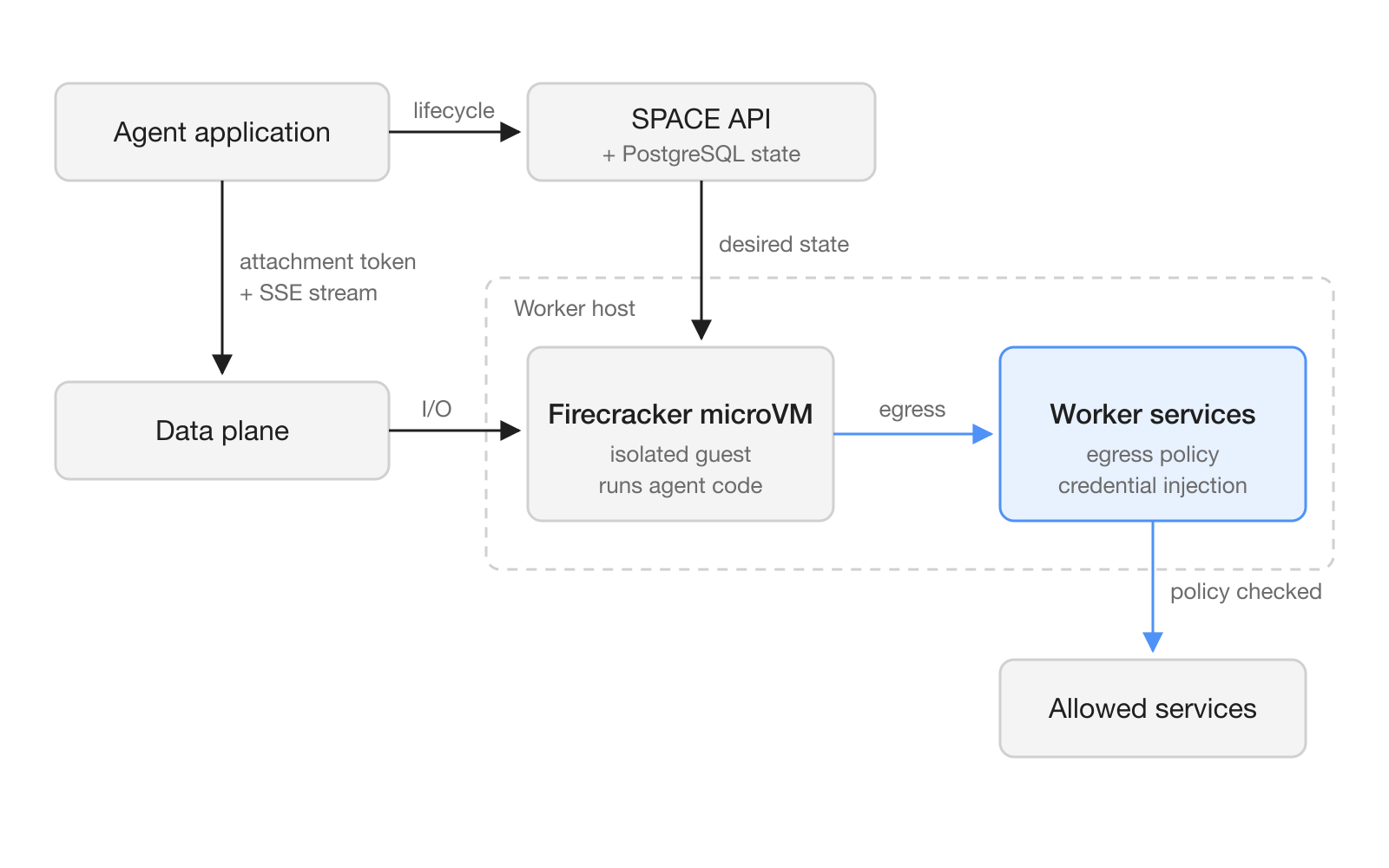
The architecture guide defines five concepts you will meet in the API [2]:
| Concept | What it is |
|---|---|
| Template | The starting filesystem and runtime configuration, for example seed:latest |
| Sandbox | An isolated microVM with its own writable filesystem and lifecycle |
| Process | A program running inside a sandbox; processes share its filesystem |
| Command session | Connection details and authorization for one command; attaching starts the process |
| Operation | A record that tracks an asynchronous create, pause, suspend, wake or delete |
Two token types keep the planes apart. Management requests use a user-session or service bearer token, while command connections use session-scoped attachment tokens, and the two are not interchangeable [2]. SPACE can run with a Kubernetes adapter, which the local guides use, or a direct adapter that calls worker services without creating Kubernetes pods.
Pause, suspend and wake
SPACE keeps long agent sessions alive through four lifecycle states [2]. A paused sandbox stops executing but keeps its memory and filesystem on the worker, which is not a durable snapshot. A suspended sandbox is saved as a snapshot of memory, runtime state and root filesystem, and its VM resources are released. Wake returns either one to running.
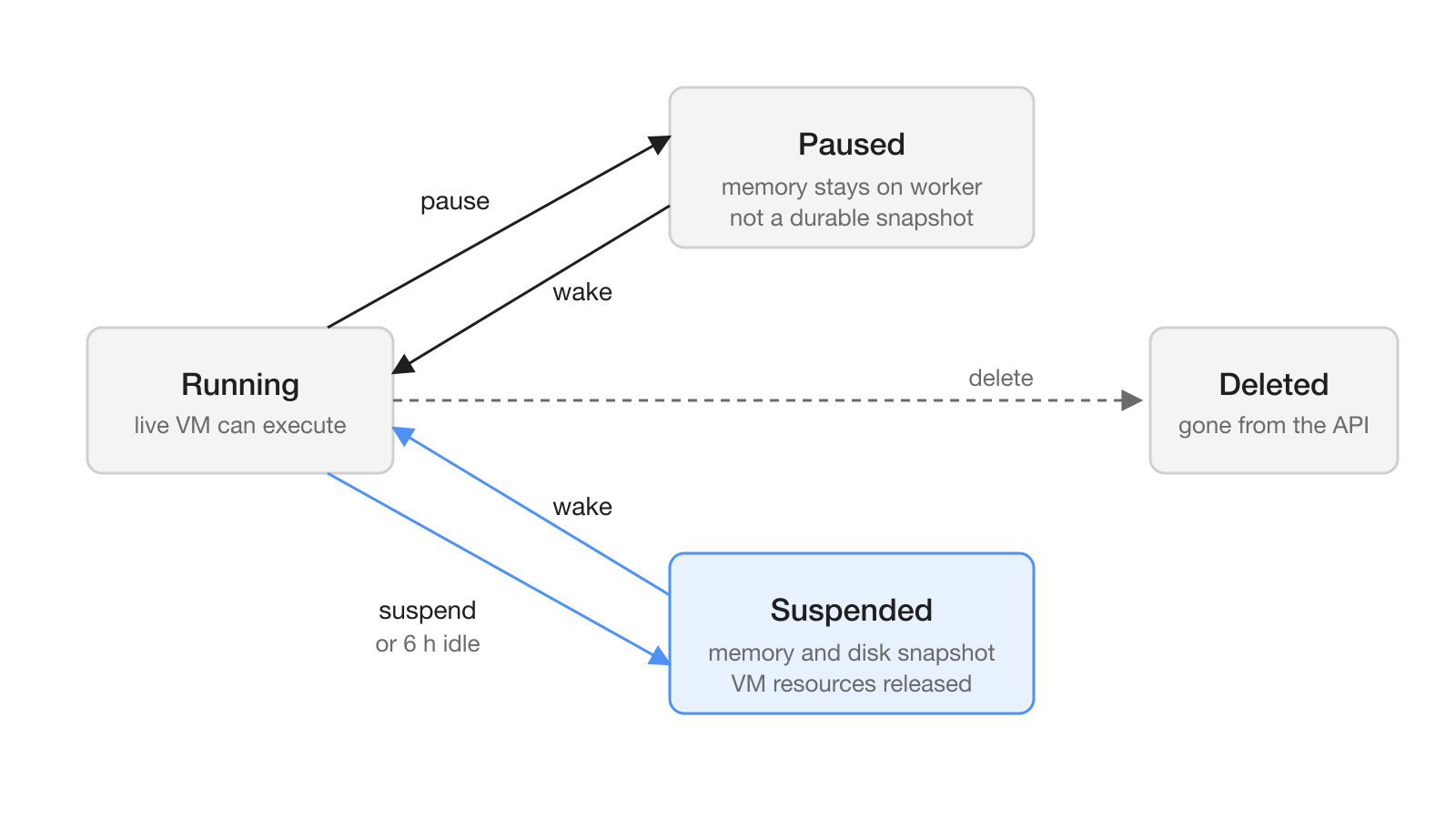
By default, sandboxes created through the API suspend after 6 hours without access or command activity, and the guide notes that this is not a maximum lifetime [2]. Storage uses btrfs copy-on-write for root filesystems and object storage for templates and snapshots.
How does SPACE control what a sandbox can reach?
SPACE puts two boundaries around agent code: Firecracker isolates guest execution, and outbound traffic passes through host-side policy [2]. The architecture guide is candid that the host side is privileged: host services still need privileges to manage VMs, storage and networking.
Operators describe network access with egress profiles. They configure named, additive policies through SPACE_EGRESS_PROFILES, and allow and exemption lists accept IP addresses, CIDR ranges and exact domain names [7]. Composing profiles adds allows and exemptions without duplicates. Explicit tenant denies and platform denies still win over any allow, and default-deny policies also receive the DNS resolver allowances the E2B wrapper needs.
TLS interception exemptions are the part to read twice. An exemption grants no egress permission on its own; after normal destination admission, the gateway relays matching SNI hostnames or destination IPs without terminating TLS, which means that traffic skips HTTP inspection and credential injection [2]. Every policy reader and running gateway must support exemptions before an operator configures a nonempty exemption list [7].
The default matters. If SPACE_EGRESS_PROFILES is unset or {}, profiles are disabled, and a non-federated create ignores the profile header and applies no profiles, defaults included [7]. In the local Kind setup, sandbox pod NetworkPolicies limit egress to the public IPv4 internet and cluster DNS [2]. That is a coarse limit, not a per-destination allowlist.
What does this mean for teams running AI agents?
For teams, SPACE answers a practical question: where an agent's code should run when it touches real data and real services. Agents that write and run code, install packages or browse need a machine they can break, and SPACE gives each one a microVM with its own writable filesystem [2]. Pause and suspend map directly onto human review. An agent can stop at a checkpoint, wait for a person to approve the next step, and wake with its state intact. A team that coordinates agents and people in one workspace, as Hardi AI does in shared channels, can use that checkpoint as the place where a person signs off.
Teams that do not want to start on their own KVM hosts can follow CoreWeave's guide. It needs a CKS cluster that uses Cilium as its network plugin, and worker nodes must be amd64 bare-metal CPU instances that expose /dev/kvm [8].
How do you try SPACE locally?
You need an apt-based Linux x86_64 host with KVM [3]. The guide also requires /dev/kvm and /dev/net/tun, btrfs support with loop devices, and a Docker daemon that allows privileged containers. The instructions do not run directly on macOS, and they only cover the Kubernetes-based local setup with Kind.
- Clone the repository and run the host check block from the installation guide [3].
- Run the prerequisite installer, which installs Kind, kubectl, Helm, grpcurl, Tilt, Go and jq.
- Unset any AWS and Datadog credentials in your shell, because bootstrap copies them into cluster secrets. Set your own console password through
SPACE_CONSOLE_PASSWORDinstead of keeping the documented default. - Run the vendor install and bootstrap scripts, then wait for the API to respond on
127.0.0.1:8080. - Run the first-sandbox example from the repository root [5].
python3 examples/first_sandbox.pyThe example creates a sandbox from seed:latest, waits for the operation to succeed and the sandbox to reach running, then creates a command session and attaches to its event stream [5]. The command it runs is a plain JSON-style object:
COMMAND = {
    "command": ["sh", "-c", "printf '%s\\n' \"$GREETING\"; pwd"],
    "cwd": "/tmp",
    "env": {"GREETING": "Hello from Python"},
    "timeout": "30s",
}
Lifecycle changes go to paths such as POST /v1/sandboxes/{id}:pause, :suspend and :wake, and each lifecycle mutation needs an Idempotency-Key [5]. Treat an accepted request as a promise, not a result: the architecture guide says "An accepted request is not a readiness signal" [2].
Moving from E2B
If your agents already use E2B, the E2B Compatibility Wrapper translates E2B requests into SPACE operations [4]. It is tested with the Python packages e2b==2.21.1 and e2b-code-interpreter==2.6.2. It supports create, list, inspect, delete, connect, timeout, refresh, pause, resume and fork. E2B pause maps to SPACE suspend, and E2B resume maps to SPACE restore.
What are the limits and open questions?
The wrapper does not cover everything. Create requests that ask for the mcp, volumeMounts or iam capabilities return 400, and JSON file writes are capped at 1 MiB [4]. Other SDK releases and the JavaScript SDK may work, but the repository's compatibility tests do not cover them.
Durability has edges too. Files are persisted at lifecycle boundaries rather than on every write, so an acknowledged write may not survive a crash, forced stop or host failure [2]. Fields marked incubating in the schema are outside the supported contract [1].
The public documentation describes how the boundaries are built, not how well they hold under attack, and it publishes no performance benchmarks. Teams that plan to run untrusted agent code on SPACE should test VM isolation and network egress on their own hosts before they rely on either.
Frequently asked questions
What does SPACE stand for?
SPACE stands for Sandboxed Platform for Agentic Code Execution. It is Perplexity's open-source platform that runs agent code in isolated Firecracker microVMs behind an HTTP API.
Is Perplexity SPACE free to use?
The code is released under the Apache License 2.0, so you can self-host and modify it. CoreWeave has also published a guide for deploying SPACE on its CKS Kubernetes service, for evaluation only.
Can I run SPACE on a Mac?
Not directly. The local installation guide requires an apt-based Linux x86_64 host with KVM, btrfs support and a Docker daemon that allows privileged containers, and says the instructions do not run directly on macOS.
How does SPACE restrict network access from a sandbox?
Operators define named, additive egress profiles through SPACE_EGRESS_PROFILES, with allow lists of IPs, CIDR ranges and exact domains, and explicit denies take precedence. When the variable is unset, profiles are disabled, so they need to be configured before relying on network confinement.
Does SPACE work with existing E2B code?
Yes, through the E2B Compatibility Wrapper, which is tested with the Python packages e2b 2.21.1 and e2b-code-interpreter 2.6.2. Some capabilities, such as mcp, volumeMounts and iam on sandbox creation, are rejected.